
A leather laptop backpack in Pakistan has to do more than look polished in a product photo. It has to carry your actual device, charger, notebook and daily essentials through a commute without pulling at the shoulders, stressing the zip or turning into an untidy black hole. That is why the best buying question is not simply “is it original leather?” It is “will this bag fit my laptop and my day?”
Measure your laptop in its sleeve, choose a bag with a protected compartment that opens wide enough, and inspect the straps, grab handle, base and zip from close-up photos. For an original leather backpack, ask the seller to name the outer material and lining instead of relying on a broad “pure leather type” label.
Start with laptop fit, not the number on the screen
“Fits a 15-inch laptop” is useful only as a starting point. Laptop screens are measured diagonally, while a backpack sleeve has a width, height and depth. Two devices with the same screen size can have different outer dimensions, especially if one has a thicker body or stays inside a protective case.
- Measure the laptop you own. Record its width, height and thickness with the sleeve or case you normally use.
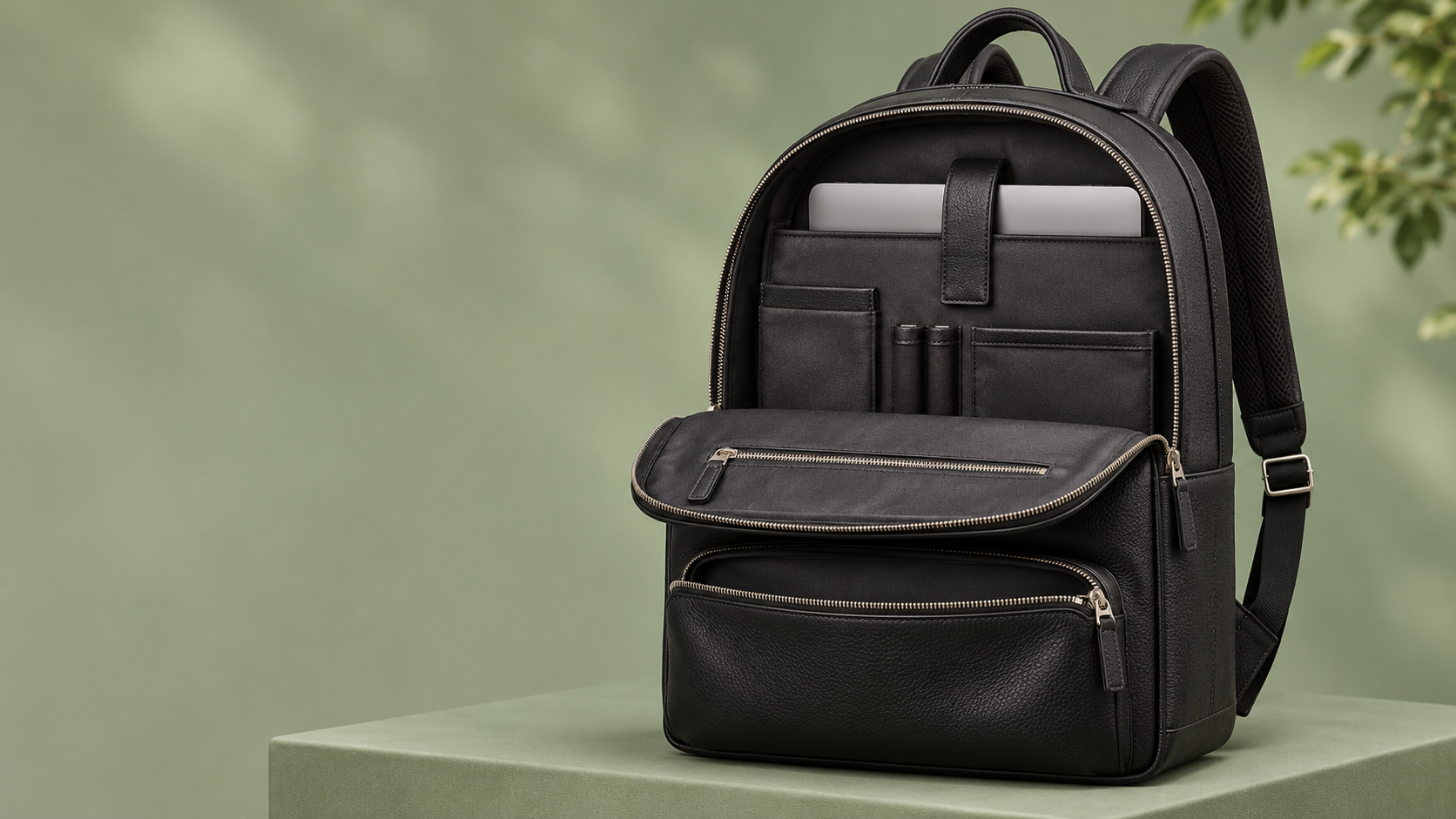
- Ask for internal sleeve dimensions. External bag dimensions do not confirm whether the laptop pocket will work.
- Leave breathing room. A sleeve that forces the zip over a device is too tight. A little space around the edge is safer and easier to use.
- Check the opening shape. A compartment may be large enough on paper but still awkward if the zip opens only halfway.
- Separate hard accessories. A charger, mouse or power bank should not press directly against the laptop screen in the same pocket.
Plan your real daily carry
Before comparing a slim bag with a larger leather office backpack, empty the bag you already use. Put the items on a table: laptop, charger, notebook, keys, wallet, bottle, lunch, headphones and any files. This simple exercise tells you whether you need extra depth or just better organisation.
| Typical carry | Useful layout | What to check |
|---|---|---|
| Laptop, charger, notebook and wallet | Slim laptop backpack | Separate sleeve, flat front pocket and compact profile |
| Laptop, bottle, lunch and headphones | Medium everyday backpack | Extra depth, stable base and room that does not press on the device |
| Laptop, files and meeting essentials | Structured office backpack | Wide opening, document section and tidy exterior |
| Laptop plus occasional overnight items | Larger work-to-travel backpack | Balanced straps, luggage-friendly shape and disciplined packing |
Extra capacity is helpful only when it does not encourage overpacking. A backpack that begins light but becomes uncomfortable after one charger and bottle is not solving the actual problem. For a comparison with a more formal carry, see our leather briefcase vs laptop backpack guide.
The comfort checks that matter on a commute
A backpack distributes weight across two shoulders, but that advantage depends on construction. The shoulder straps, their anchors and the back panel do more work than a decorative front pocket. If a seller shows only the front, ask to see the back, underside and strap attachments before ordering.
Straps and adjustment
Look for straps wide enough to spread the load and adjustable enough to bring the bag close to your back. Long, loose straps let the bag hang away from the body, which can feel heavier while walking. The top grab handle also deserves attention: it should be anchored securely because it takes the full load every time you lift the bag.
Back panel and balance
A lightly padded or structured back panel can stop hard corners from pressing into you, but “more padding” is not automatically better. The important point is balance: the laptop should sit close to the back, and the bag should stand reasonably upright when you put it down.
Empty weight
Leather, lining and hardware can make a bag feel substantial before it is packed. If you commute by foot, bike or public transport, ask for the empty weight. A beautiful bag that is already heavy when empty may not be the right all-day choice.
Original leather and “pure leather type”: ask for a clear description
Searches for original leather backpack Pakistan and pure leather type reflect a sensible concern: buyers want to know what they are paying for. The useful answer is specific. Ask what the outer is made from, whether a hide type is known, what the lining is, and what finish is on the surface.
Cowhide and buffalo leather can suit a more structured work bag. Goatskin can offer strength at a lighter weight. Lambskin is softer and usually needs gentler use. None of those descriptions guarantees quality alone; the zip setting, stitching, handle anchors, strap construction and lining are just as important for a daily backpack.
Be cautious with vague material labels. Bonded or reconstituted leather is not the same thing as a complete hide, and the FTC material guidance says it should not be represented simply as leather. Treat that as a practical clarity standard: choose a seller who can explain the material rather than one who only repeats a broad marketing phrase.
Nine checks before buying a leather laptop backpack online
1. Match the sleeve to your own laptop
Compare internal sleeve dimensions with your laptop in its normal case, not just the advertised screen-size range.
2. Look at the straps from the back
Check the width, adjusters and attachment points. Back-only photos are essential for a backpack purchase.
3. Inspect the top handle and base
These parts take repeated load. Reinforced handle patches and a base that does not sag are useful signs of a practical design.
4. See the zip path open
A wide opening makes it easier to remove a laptop; close-up video or photos can also show whether the zip runs smoothly around corners.
5. Separate the laptop from accessories
Choose a layout that gives the charger, pens and keys their own space so they do not scratch or press against the device.
6. Check the stated material and lining
Ask directly about the outer material, lining and finish. Keep the written response with the product listing.
7. Consider the empty weight
The heavier the bag is before packing, the less pleasant it may be on a long commute.
8. Read the exchange terms first
Laptop fit and comfort are personal. Confirm the exchange process before paying, especially if dimensions are important to you.
9. Compare the photos with the details
Look for consistent pocket placement, zips, stitching and hardware across all images. Ask when anything in the description is unclear.
Care and storage in Pakistan
Use a soft dry cloth to remove everyday dust. If the bag gets wet, empty it, reshape it gently and let it dry at room temperature away from direct heat. Do not seal a leather bag in plastic for long storage; it needs airflow. The Canadian Conservation Institute notes that humidity above 65% favours mould growth on leather, so a dry, ventilated cupboard is a better choice in humid conditions.
Avoid carrying more than the straps and seams were designed to handle. Empty receipts, pens and chargers regularly, and do not let the front pockets become so full that they distort the bag. Small habits protect the shape and make the laptop section easier to use.
Frequently asked questions
Is a leather laptop backpack good for office use?
Yes, when the design is compact, organised and free of unnecessary external straps or loud branding. A clean structured backpack works well for many modern offices, especially when you commute with a laptop and daily essentials.
Will a 15.6-inch laptop fit in every 15-inch backpack?
No. Screen size is only a rough label. Compare your device’s outside measurements, including its sleeve, with the bag’s internal laptop-compartment measurements.
Which pure leather type is best for a laptop backpack?
Cowhide and buffalo leather can suit structured work bags, while goatskin may reduce weight. The stronger buying decision also checks the straps, handle, lining, zips and laptop sleeve.
How can I tell if an online leather backpack is original leather?
Ask for a specific outer-material description, inspect photos of the grain, seams, edges and strap anchors, and read the exchange policy. A single label or studio photo is not enough proof by itself.
Should the laptop sleeve be padded?
Some padding or separation from hard accessories is useful, but correct fit and a secure compartment matter more than a thick padded label. The laptop should not be forced against a zip or loose enough to slide around.
Choose a backpack that fits the full workday
The right leather laptop backpack balances protection, comfort and organisation. Measure first, compare the carrying system, ask clear material questions and buy from a seller whose dimensions and exchange terms are easy to understand. Browse the LeatherCulture journal for more buying guides or contact the team for current product information.